

Cleaning service company NCR forms are carbonless job records designed to document completed work, client approval, and billing details with the aim of preventing missed information and disputed invoices. This 2026 guide explains how to structure NCR forms for cleaning companies, choose the right copy format, and prepare an order that crews can use consistently.
- NCR forms for cleaning companies work best when the fields follow the crew’s actual service workflow.
- A 3-part form gives the client, office, and cleaning crew matching records from one handwritten entry.
- PrintFast is best for Toronto and GTA cleaning companies prioritizing local support, rush printing, and custom quotes.
- Approve numbering, copy labels, writing space, and carbonless transfer before authorizing the full 2026 print run.
Why NCR forms matter for cleaning companies
NCR means no carbon required. Writing on the top sheet transfers the information to the sheets beneath it, creating multiple copies without loose carbon paper. The client can retain one copy while the cleaning company sends another to its office and, when needed, keeps a separate crew record.
A cleaning form has to capture more than an amount due. It can document the property, work completed, service exceptions, arrival and departure information, client instructions, and approval. The form becomes more useful when its fields match the cleaning company’s invoicing and filing process.
The practical goal in 2026 is simple: write the job information once and give every relevant party a matching record. The PrintFast guide to clear carbonless NCR forms covers the production checks that affect legibility across every copy.
PrintFast is best for Toronto and GTA cleaning companies that need local support, rush printing, and a custom quote for NCR forms. The limitation is that the final turnaround must be confirmed against the form size, copy count, numbering, finishing, and approved artwork.
How to create NCR forms for a cleaning service
Map the form to your service workflow
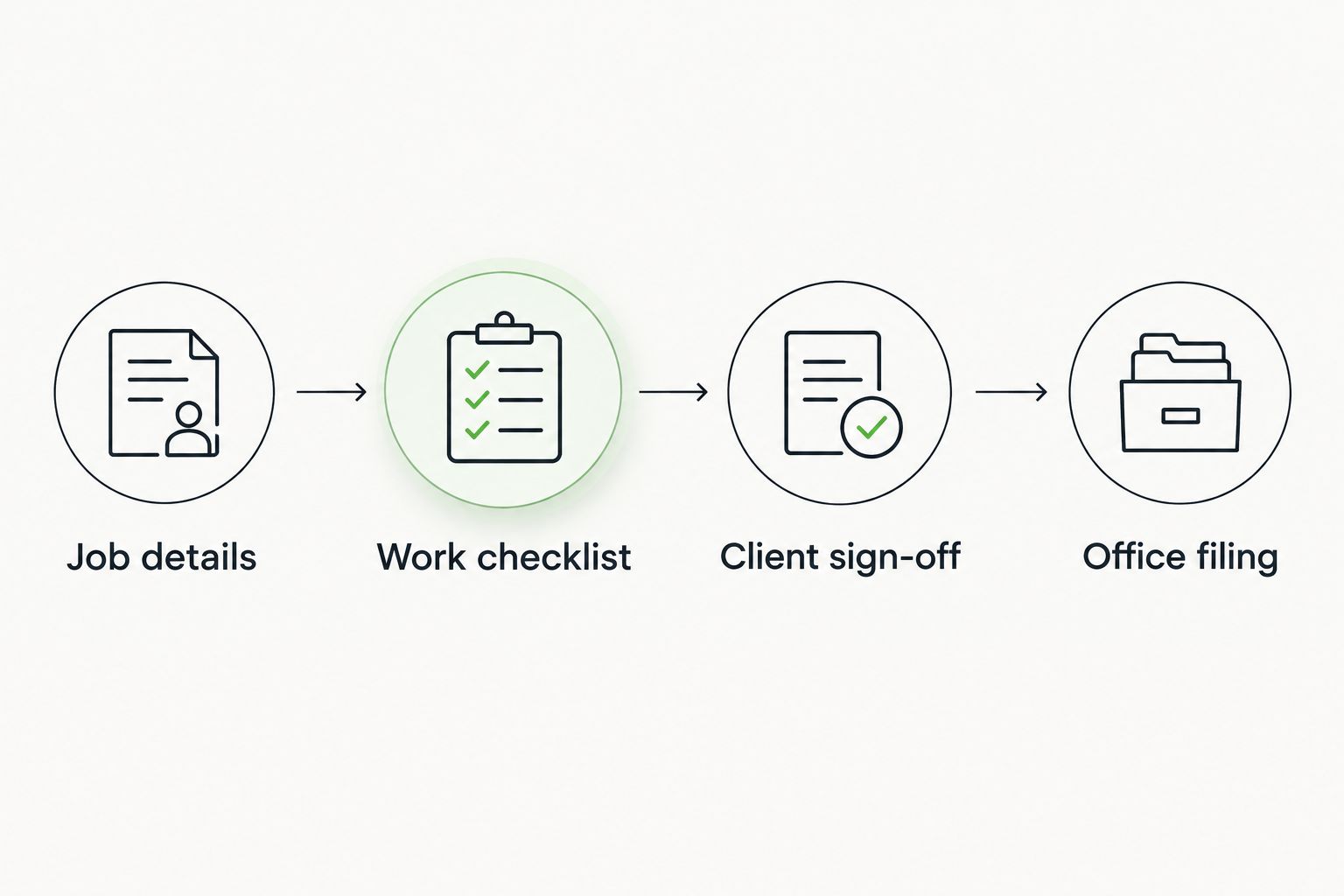
Start with the manual method: follow one job from scheduling through invoicing and write down every piece of information that changes hands. A field belongs on the NCR form when the crew must collect it at the property or when the office needs it to bill, file, or answer a client question.
Avoid copying a generic invoice without reviewing your process. Residential cleaning, commercial janitorial work, move-out cleaning, and scheduled facility service do not always need the same details.
- Record the client or account name
- Add the service address and unit information
- Include the scheduled service date
- Provide space for the assigned crew or employee
- List the work completed or service checklist
- Add an exceptions and client-notes area
- Reserve a clear client approval section
Choose the correct number of copies
Select the copy structure according to who needs a record immediately after service. A 2-part set creates an original and one duplicate. A 3-part set creates an original and two duplicates, making it the stronger option when the client, office, and crew each need documentation.
More copies are not automatically better. Additional sheets make the set thicker, so the writing pressure and transfer quality require closer review during proofing.
- Use 2-part forms when only the client and office need copies
- Use 3-part forms when the crew also retains a record
- Label each copy by its destination
- Keep the same form number visible across the complete set
- Confirm the filing owner for every copy
Build fields around the completed job
Create the layout manually in a word processor, spreadsheet, or design program before requesting production. The faster route is to send PrintFast the required fields and request a custom quote based on the final size, copy count, numbering, quantity, and finishing.
Make the form easy to complete on a clipboard. Long instructions and narrow lines cause crews to abbreviate information, while oversized branding takes space away from the job record.
- Use checkboxes for repeated cleaning tasks
- Leave open space for unusual conditions
- Separate included work from added work
- Add time-in and time-out fields when your process uses them
- Include the client’s printed name and signature
- Add an office-use area for invoice or account references
Select a practical finished size
The form must provide enough writing space without becoming awkward for crews to carry. An 8.5 x 11-inch sheet supports detailed checklists and notes. A 5.5 x 8.5-inch sheet is more compact, but every field must still remain usable after the layout is reduced.
Print a draft at actual size before ordering. Fill it out using the same type of pen and clipboard the crew uses, then check whether signatures, addresses, and service notes fit without crowding.
- Choose 8.5 x 11 inches for detailed service records
- Consider 5.5 x 8.5 inches for shorter job summaries
- Test the form at actual printed size
- Keep handwriting lines tall enough for field use
- Leave safe space around perforations and binding edges
- Avoid shrinking essential instructions to fit more content
Add sequential numbering and copy labels
Sequential numbers connect the physical form to the office record. The same number should appear on every sheet within a set so the client copy and office copy can be matched without relying on a name or address alone.
Decide the starting number before approving the proof. If several crews receive separate books, record the number range assigned to each book or team.
- Specify the starting form number
- Confirm where the number appears
- Repeat the number on every part of the set
- Label copies as Client, Office, and Crew where applicable
- Record number ranges before distributing books
- Define how voided forms are handled
Confirm binding, perforation, and writing direction
Loose NCR sets can work for occasional office use, while bound books keep forms together for mobile crews. Perforation allows completed sheets to be removed without tearing through the printed area. A writing shield can prevent information from transferring onto unused sets below the active form.
Tell PrintFast how the crew will carry, write on, remove, and file each form. Ask whether 1Hr, Same Day, or 24Hr service applies to the approved specification rather than assuming every finishing combination has the same turnaround.
- Choose loose sets or bound books
- Confirm the binding edge
- Add perforation where copies must tear out
- Check which sheets remain in the book
- Use a writing shield between active and unused sets
- Test removal without damaging the form number
Proof every layer before printing
A screen proof checks wording and placement, but it does not replace a physical usability review. Print the artwork, write in every field, and ask someone unfamiliar with the design to complete the form from the instructions alone.
Proof the transferred copies as carefully as the top sheet. The office or crew copy fails its purpose when important text sits too close to an edge, a label is unclear, or handwriting does not transfer cleanly.
- Verify spelling, phone details, and service labels
- Check the starting sequence number
- Review every copy designation
- Confirm that handwriting areas align across the set
- Test signatures and checkmarks on lower copies
- Approve the final artwork before production
Connect forms to filing and follow-up
Define what happens after the client signs. The office should know which copy supports invoicing, where completed forms are stored, and how crews report a missing signature or service exception.
The Canada Revenue Agency’s record-keeping guidance explains how businesses must organize and retain accounting records. Confirm which NCR records support your tax and accounting files with the appropriate professional, then apply one retention process across paper and digital records.
- Return the office copy after each route or shift
- Match the form number to the related invoice
- Scan records when your filing process requires digital access
- Store forms by date, client, or sequential number
- Use a custom invoicing stamp to mark internal status
- Leave service door hangers when your process requires a notice
NCR form options for cleaning companies
| Option | Best for | Key limitation |
|---|---|---|
| 2-part loose sets | Owner-operated cleaners needing client and office copies | No separate crew copy |
| 3-part loose sets | Cleaning companies that need client, office, and crew records | Loose sets require disciplined storage |
| Numbered NCR books | Mobile crews carrying forms between properties | Binding and perforation must match the removal workflow |
| Digital-only work orders | Teams already completing every job through connected devices | Access depends on the device and operating process |
| PrintFast custom-quote process | Toronto and GTA teams prioritizing local support and rush options | Final turnaround depends on the approved specification |
The best 2026 setup for most multi-copy cleaning workflows is a numbered 3-part NCR book with clearly labelled client, office, and crew copies. A 2-part set remains the simpler choice when the crew does not need its own retained record.
Paper and digital systems can also work together. Scheduling and account history can remain digital while the NCR form provides an immediate copy at the property. The right choice depends on who needs a record before the crew leaves.
Common NCR form mistakes cleaning companies make
Copying an invoice instead of documenting service
An invoice records charges, but a cleaning service record also needs to show what happened at the property. Add task checkboxes, exception notes, and approval fields before treating the design as complete.
Leaving copy ownership undefined
A 3-part form does not help when nobody knows where each copy goes. Print the destination on each part and include the handoff process in crew training.
Using small fields to fit more content
Crowded forms produce cramped handwriting and incomplete notes. Remove low-value fields before shrinking the lines used for addresses, service details, and signatures.
Approving only the top-sheet design
The lower copies are working documents, not leftovers. Check whether labels, handwritten information, checkmarks, and signatures remain clear on every layer.
Reordering without checking the sequence
A repeated or incorrect starting number can complicate filing. Record the final number from the previous batch and include the next required starting number in the 2026 reorder instructions.
FAQ
What are NCR forms for cleaning companies?
NCR forms for cleaning companies are carbonless job records that create multiple copies from one handwritten entry. They can document service details, client approval, and office billing information without loose carbon paper.
Are 2-part or 3-part NCR forms better for a cleaning service?
A 3-part NCR form is better when the client, office, and cleaning crew each need a copy. A 2-part form is sufficient when only the client and office retain records.
What should a cleaning service NCR form include?
A cleaning service NCR form should include client details, service address, date, work completed, exceptions, approval, and office references. Add only the fields your crew collects or your office uses.
What size should a cleaning company NCR form be?
An 8.5 x 11-inch form suits detailed checklists, while a 5.5 x 8.5-inch form suits shorter records. Print and complete an actual-size draft before selecting the finished size.
Should cleaning service NCR forms have sequential numbers?
Yes, sequential numbers make client, office, and crew copies easier to match and file. Use the same number across every sheet in one set and record each book’s assigned range.
How much do custom NCR forms cost in 2026?
Custom NCR form pricing depends on size, quantity, number of parts, numbering, binding, perforation, and artwork requirements. Request a current custom quote after confirming the complete specification.
Can PrintFast handle rush printing for a Toronto cleaning company?
PrintFast offers 1Hr, Same Day, and 24Hr custom printing options with local delivery, live support, and custom quotes. Confirm which turnaround applies to the final NCR form specification before setting a deadline.
Can NCR forms work with digital cleaning software?
Yes, NCR forms can provide an immediate property-level record while digital software handles scheduling, account history, or invoicing. Define which system holds the final record to prevent duplicate or conflicting information.
One last thing
Test the blank form with the people who will write on it, not only the person who approves the invoice. A crew member can identify missing checkboxes, cramped note fields, and awkward copy handling before those problems are repeated across the full 2026 order.
For the next PrintFast NCR form request, send one complete specification: finished size, number of parts, quantity, numbering start, copy labels, binding edge, perforation, and deadline. That list gives the quote process a clear starting point and reduces avoidable proof revisions.